
My site has Google impressions but few clicks: what should I check?
Your impressions are rising in Search Console, but clicks are not following. Before rewriting every page, find the gap: which searches show your site, which pages are involved and how their visibility is changing. Here is a method for choosing an action based on available data.
Start by distinguishing impressions, clicks and CTR
An impression is a counted appearance in Google results. A click is an interaction leading to your site. CTR is the proportion of clicks to impressions: clicks ÷ impressions × 100. Google explains these metrics in its Performance report overview.
So it is possible to gain impressions and lose CTR. Your site may start appearing for new searches without receiving many clicks from them. That is an explanation to check in the queries, not a conclusion to draw from the overall chart alone.
First choose a page that matters to your business. On a product page, you want visits that could lead to the offer. On a guide, you want to help readers solve their problem, then suggest a relevant next step. The two pages do not necessarily play the same role.
Compare consistent periods and filters
In the Performance report, select Web search, then compare two periods of equal length. Keep the same country and device filters. Google’s guide to filters and comparisons explains this process.
- Look at clicks and impressions together. Falling clicks alongside falling impressions raise a different question from declining CTR with more impressions.
- Open the Pages tab. Find URLs contributing to the change that are useful to your business.
- Filter one page, then look at its queries. This connects search intent with the content actually offered.
- Record the comparison conditions. Keep the dates and filters so you can repeat the same analysis after a fix.
Average position is an aggregated reference point. It does not describe a fixed ranking for every user. Google explains this in its guide to impressions, position and clicks. Avoid choosing a fix based on this number alone.
A real example: more impressions, fewer clicks
In the rosoai.fr data analyzed on September 16, 2026, August 17 to September 13 recorded 36 clicks and 301 impressions, versus 41 clicks and 266 impressions from July 20 to August 16. CTR went from approximately 15.4% to 12.0%.
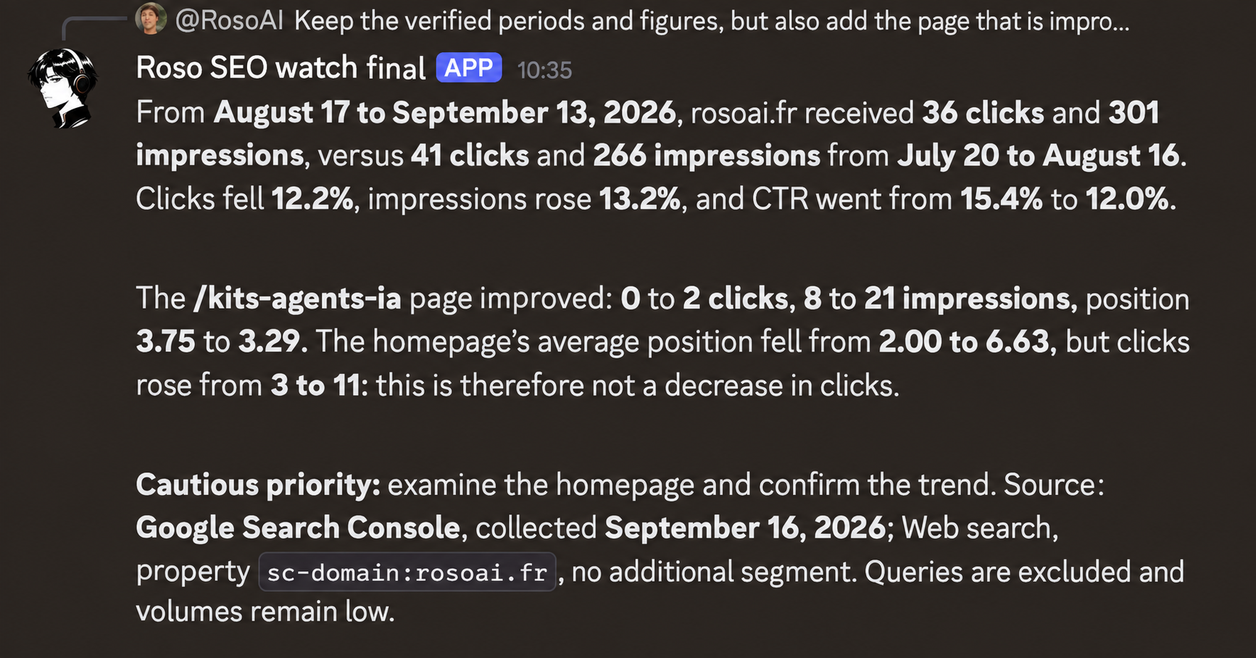
Page details add nuance to the total. The kits page went from zero to two clicks. The homepage went from three to eleven clicks while its average position declined. Saying all pages lost clicks because of their position would therefore be incorrect.
At this point, the next check concerns queries for the pages involved and whether the trend holds. This snapshot cannot attribute the variation to a title, a site change or use of the agent.
Check that the page answers the search
Read the page’s queries as questions from future readers. Are they looking for a definition, tutorial, example, price or solution to buy? Then open your page and check whether that answer is clear.
If the search is for an audit example and the page only describes features, a visible example may be missing. If the search is about requirements, check that the necessary tools and possible fees are easy to find.
You can also examine Google results for a few important queries to understand the formats shown. A manual search helps you see that context; it does not replace Search Console data or its filters.
Form a specific hypothesis before acting: ‘The page gets impressions for a search about examples, but shows no deliverable.’ You now have a concrete change to evaluate.
Improve the title and snippet when the content is relevant
A title should describe what visitors will find on the page. Check its accuracy, consistency with the main heading and absence of promises the content does not fulfill. Google builds title links from several elements: changing the title tag does not guarantee that its wording will be used exactly. See its title link recommendations.
The description and page content can contribute to the displayed snippet. Google may choose a different passage depending on the search. Its snippet documentation explains how this works.
Prepare wording that names the topic, the answer provided and, where relevant, the available format. For example, an article providing an annotated diagnostic report can mention that example in its title. Keep the same precision throughout the page.
If the content does not answer the search, start by expanding it. A catchier title does not replace the expected answer.
Choose one fix and record the outcome
For a priority page, record the starting point, hypothesis, change and date. Then use the same periods and filters to observe clicks, impressions and queries. With limited data, wait for enough observations before concluding; a few clicks can change a percentage substantially.
If clicks improve, also check what visitors do next using available conversion data. More traffic does not automatically demonstrate more sales.
The SEO/GEO Kit helps you run a diagnostic review and organize fixes. You can read a complete audit example in Codex. For ongoing monitoring, your personal SEO agent compares connected data and sends its analysis to you in Discord.
In both cases, expect a dated observation, an explanation to check and an action you understand.
Track your data without starting over
Your personal SEO agent retains the context of its observations, compares data you connect and sends its priorities to you in Discord. You keep control over site changes.
Explore my SEO agent